HDMI ARC/eARC to Toslink SPDIF and 3.5mm Audio Converter Cable with USB power supply
How to Connect an HDMI ARC TV to Toslink or 3.5 mm Audio Equipment
Learn how HDMI ARC to Toslink, HDMI ARC to 3.5 mm, and Toslink to HDMI ARC converters connect modern TVs with soundbars, speakers, and amplifiers.
HDMI ARC to Toslink converter, HDMI ARC to 3.5 mm audio converter, Toslink to HDMI ARC adapter, connect TV to old speakers, HDMI ARC optical audio converter, HDMI ARC AUX adapter.
Upgrading a television does not always mean the rest of an audio system needs to be replaced. Many current TVs use HDMI ARC as their main external-audio connection, while existing soundbars, powered speakers, amplifiers, and installed audio systems may rely on Toslink optical or 3.5 mm AUX inputs. The devices may still work perfectly, but their connectors do not match.
An HDMI ARC audio converter bridges that gap. The correct converter can route TV audio to an optical input, create an analog 3.5 mm output, or support the reverse type of connection when a Toslink source must feed an HDMI ARC-compatible audio receiver. The key is choosing the correct signal direction—not simply finding plugs that fit.
This guide explains the four RUIARA converter formats, where each one fits, and what to check before installation.
What Does HDMI ARC Do?
ARC stands for Audio Return Channel. It allows a compatible TV to send audio upstream through an HDMI connection to an audio receiver or soundbar. The [HDMI Licensing Administrator’s HDMI 1.4b overview](https://www.hdmi.org/spec/hdmi1_4b) describes ARC as a way for an HDMI-connected TV to return audio to an AVR or soundbar without a separate audio cable.
Not every HDMI port is an ARC port. On many TVs, only one connector is labeled HDMI ARC or HDMI eARC/ARC. A normal HDMI input may look identical but will not provide the same audio-return function.
That distinction matters when using a converter. The converter must receive a valid ARC signal from the designated port and translate it into the connection required by the downstream audio device.
Why Use an HDMI ARC Audio Converter?
A converter is useful when the TV and audio equipment support different interface generations. Common examples include:
– A new TV with HDMI ARC and a soundbar with only a Toslink optical input
– A wall-mounted display connected to an older AV receiver
– A smart TV that needs to feed powered desktop speakers through 3.5 mm AUX
– A hotel or commercial display that must connect to an existing analog audio system
– An optical-output source that needs to connect to an HDMI ARC-compatible receiving device
In each case, the converter preserves the usable audio equipment and provides a clearer upgrade path than replacing the complete system.
Four Directional Converter Options
HDMI ARC to Toslink Converter Cable
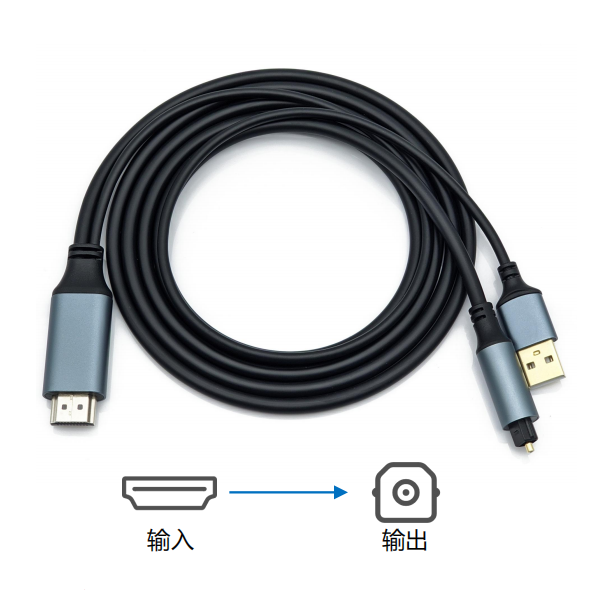
This version accepts audio from the ARC port of a compatible TV or display and provides a Toslink optical output. It is designed for soundbars, AV receivers, home-theater systems, DACs, and other equipment with an optical input.
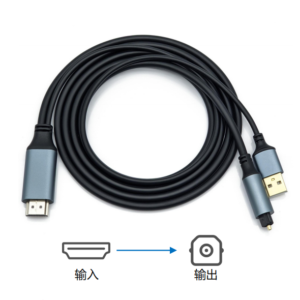
Signal path:
TV HDMI ARC output → HDMI ARC to Toslink converter → optical audio input
The optical side carries digital audio through light rather than an electrical audio connection. That makes Toslink useful in installations where electrical isolation and resistance to electromagnetic interference are important. It can also help avoid ground-loop noise between connected audio components.
The integrated cable-style design keeps the installation compact. It works especially well behind a TV, inside a media cabinet, or in a commercial display system where a separate converter box would add clutter.
Best suited to:
– Optical-input soundbars
– AV receivers and home-theater systems
– Legacy amplifiers with Toslink input
– DACs and installed digital-audio equipment
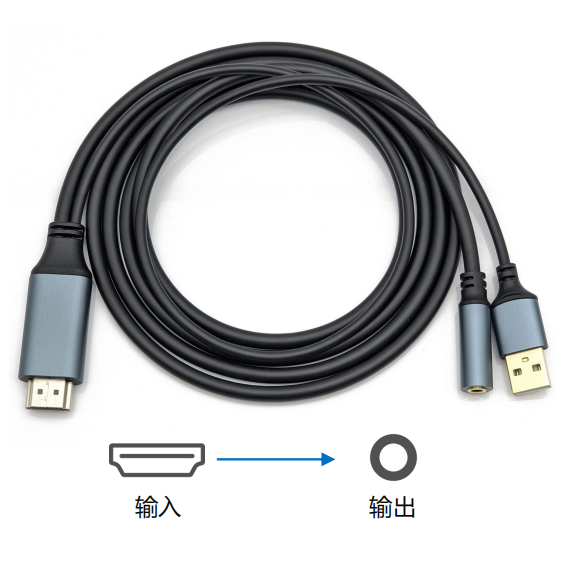
2. HDMI ARC to 3.5 mm AUX Converter with Male Plug
Toslink is a digital interface, while 3.5 mm AUX is analog. Connecting an ARC-enabled TV to a 3.5 mm input therefore requires active signal conversion, not only a change in connector shape.
The male-plug version combines an HDMI ARC input, a fixed 3.5 mm output plug, and a USB power lead in one cable assembly. The product presentation identifies 5 V USB power for stable operation. The 3.5 mm plug can connect directly to a suitable AUX input, reducing the number of separate cables needed.
Signal path:
TV HDMI ARC output → powered HDMI ARC converter → 3.5 mm AUX input
Best suited to:
– Powered speakers
– Desktop audio systems
– Older amplifiers with a 3.5 mm input
– Existing analog audio equipment with its own amplification
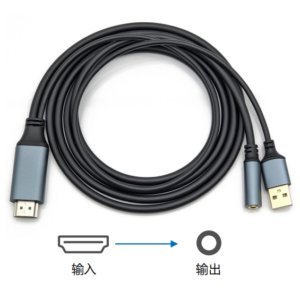
This format is convenient when the destination device is close to the TV and a direct 3.5 mm connection is preferred.
HDMI ARC to Female 3.5 mm AUX Converter
The female-socket version performs the same general digital-to-analog conversion but provides a 3.5 mm jack instead of a fixed male plug. A separate AUX cable can then be selected to match the installation.
Signal path:
TV HDMI ARC output → powered HDMI ARC converter → separate 3.5 mm cable → audio input
The female connection is particularly useful when cable routing, equipment placement, or future serviceability matters. Installers can choose a suitable AUX cable length, replace that cable independently, or route the connection through a cabinet or wall plate. The product presentation also shows a 5 V USB power connection.
Best suited to:
– Hotel-room TV and audio installations
– Commercial display systems
– System integration projects
– Custom cable-length requirements
Toslink to HDMI ARC Female Adapter
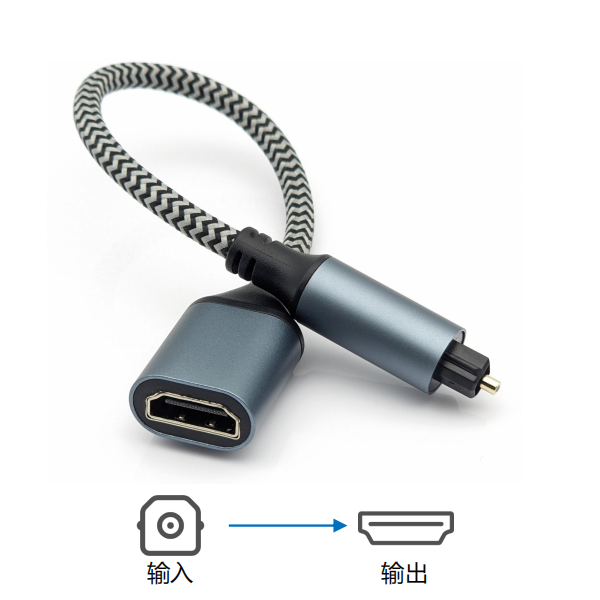
This is the reverse-direction option. It accepts a Toslink digital-audio signal and converts it for an HDMI ARC-compatible receiving path.
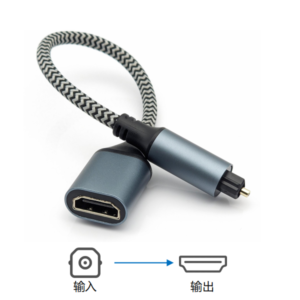
Signal path:
Toslink audio output → Toslink to HDMI ARC converter → ARC-compatible audio receiver
This product must not be confused with an HDMI ARC to Toslink converter. The connectors may appear similar, but the source and destination roles are reversed. It can be useful when a TV, media player, set-top box, or other source provides optical audio while the receiving soundbar or audio system expects audio through its HDMI ARC connection.
Because HDMI ARC roles and device labeling can vary, confirm that the intended destination is designed to receive ARC audio before selecting this version.
Quick Comparison
| Converter type | Audio source | Destination connection | Main benefit |
|—|—|—|—|
| HDMI ARC to Toslink | ARC-enabled TV or display | Toslink input | Digital optical connection and electrical isolation |
| HDMI ARC to 3.5 mm male | ARC-enabled TV or display | Nearby 3.5 mm AUX input | Direct analog connection with fewer separate cables |
| HDMI ARC to 3.5 mm female | ARC-enabled TV or display | AUX device through a separate cable | Flexible length, routing, and replacement |
| Toslink to HDMI ARC female | Optical-output source | ARC-compatible audio receiver | Supports the reverse optical-to-ARC signal direction |
How to Choose the Right Converter
Start with the labels on the devices, not the appearance of the plugs.
1. Identify the audio source.
If the sound originates from the TV’s HDMI ARC port, choose one of the HDMI ARC-to-audio options. If the source provides optical output, consider the Toslink-to-HDMI ARC version.
2. Identify the receiving input.
Choose Toslink for an optical-input sound system or 3.5 mm for a suitable analog AUX input.
3. Check signal direction.
HDMI ARC to Toslink and Toslink to HDMI ARC are different products and are not interchangeable.
4. Decide between a fixed plug and a socket.
Choose the male 3.5 mm version for a direct connection or the female version when a separate AUX cable provides better routing flexibility.
5. Confirm audio-format compatibility.
Supported formats are model-specific. Check the converter specification and the receiving device before installation.
6. Check power requirements.
The 3.5 mm converter variants shown here use a USB power connection. Confirm the required power source and whether an adapter is included.
Basic Installation Steps
1. Locate the TV port specifically labeled HDMI ARC or HDMI eARC/ARC.
2. Turn off or mute the connected equipment before changing audio cables.
3. Connect the converter in the indicated signal direction.
4. Connect the Toslink or 3.5 mm output to the correct input on the soundbar, amplifier, powered speaker, or other receiving device.
5. Connect USB power when required by the converter model.
6. In the TV’s audio menu, enable ARC and the manufacturer’s HDMI control setting if required. HDMI control may be called CEC, Anynet+, Simplink, Bravia Sync, VIERA Link, or another brand-specific name.
7. Select the external audio system as the TV’s sound output.
8. Choose an audio-output format supported by both the converter and the receiving device.
If there is no sound, recheck the ARC-labeled port, signal direction, USB power, TV audio-output setting, and selected input on the audio equipment. Audio-format mismatches are another common cause, so consult the specifications for the exact converter model.
Toslink or 3.5 mm: Which Output Is Better?
Choose Toslink when the receiving equipment has an optical input and a digital connection is preferred. Optical transmission provides electrical isolation and is a practical match for soundbars, AV receivers, home-theater systems, and DACs.
Choose 3.5 mm AUX socket when the destination is a powered analog speaker system, desktop audio product, or legacy amplifier without optical input. The male version simplifies a short direct connection, while the female version offers more control over cable length and routing.
The better choice is the one that matches the actual input and capabilities of the receiving equipment. A connector alone does not determine audio quality; the supported audio format, conversion stage, downstream amplifier, speakers, and installation all matter.
Frequently Asked Questions
Can I connect a TV’s HDMI ARC port to an optical soundbar?
Yes. Use a directional HDMI ARC to Toslink converter. Connect the HDMI side to the TV’s ARC-labeled port and the optical side to the soundbar’s Toslink input. Confirm supported audio formats for the exact converter and soundbar.
Can HDMI ARC connect to powered speakers with a 3.5 mm input?
Yes. An active HDMI ARC to 3.5 mm converter changes the digital ARC signal into analog audio. The RUIARA male and female 3.5 mm versions shown in this series use USB power. The speakers must have a suitable input and their own amplification.
What is the advantage of a female 3.5 mm output?
A female socket lets the installer choose and replace the AUX cable independently. This is useful for long routes, cabinets, commercial installations, and projects where equipment placement may change.
Are HDMI ARC to Toslink and Toslink to HDMI ARC the same?
No. They work in opposite directions. Choose according to which device produces the audio signal and which device receives it.
Will an HDMI ARC converter work with eARC?
Do not assume universal eARC compatibility. ARC and eARC capabilities depend on the converter and connected devices. Check the model specification and, when necessary, configure the TV to use a compatible ARC audio mode.
Why is there no sound after connection?
The most common checks are the HDMI port label, ARC/CEC settings, external-speaker selection, converter power, signal direction, audio format, and destination input. Testing with a known compatible audio mode can help isolate a format-related issue.
Keep Existing Audio Equipment Working with a New TV
An interface mismatch does not have to make a soundbar, amplifier, or powered speaker system obsolete. A correctly selected HDMI ARC audio converter creates a practical bridge between a modern TV and established Toslink or 3.5 mm equipment.
Before ordering, identify three details: the source device and output, the destination device and input, and the required signal direction. With those points confirmed, it becomes much easier to choose between HDMI ARC to Toslink, HDMI ARC to 3.5 mm male, HDMI ARC to 3.5 mm female, or the reverse Toslink to HDMI ARC format.
Need help matching a converter to an installation? Share the source device model, destination device model, and connector labels so the signal path can be checked before purchase.